#>   price
#> 1     1
#> 2     2
#> 3     3
Utility Models
EMSE 6035: Marketing Analytics for Design Decisions
John Paul Helveston
October 14, 2026
Week 8: Utility Models
1. Utility models
2. Exploring choice data
3. Linear & discrete parameters
4. No choice
5. Team project utility models
Week 8: Utility Models
1. Utility models
2. Exploring choice data
3. Linear & discrete parameters
4. No choice
5. Team project utility models
Random utility model
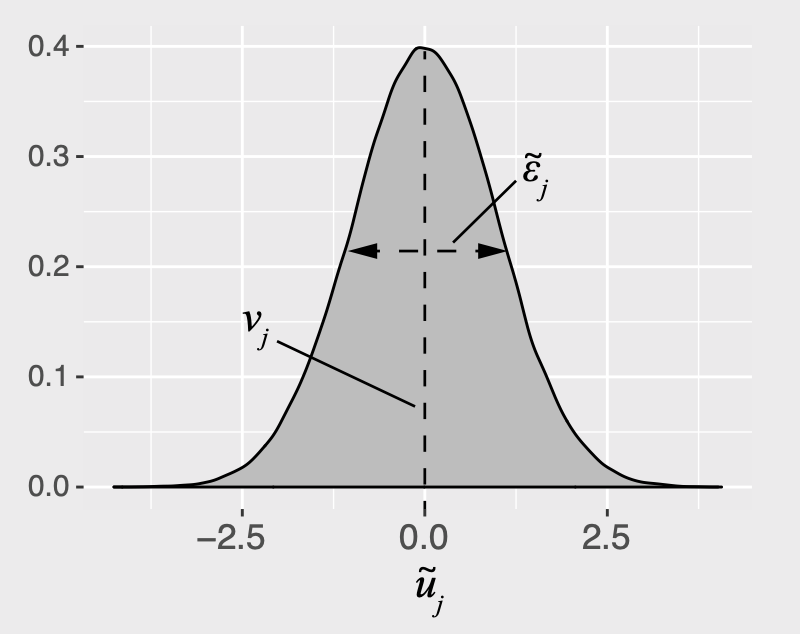
The utility for alternative \(j\) is
\[\tilde{u}_j = v_j + \tilde{\varepsilon}_j\]
\(v_j\) = Things we observe (non-random variables)
\(\tilde{\varepsilon}_j\) = Things we don’t observe (random variable)
\[\tilde{u}_j = v_j + \tilde{\varepsilon}_j\]
Practice Question 1
- A random variable, \(\tilde{x}\), has the PDF, \(f_{\tilde{x}}(x)\). Write the equation to compute its total probability (hint: think area under the curve!). What is the answer to the equation?
- A random variable, \(\tilde{x}\), has a uniform distribution between the values 0 and 1. Draw the probability density function (PDF) and Cumulative Density Function (CDF) of \(\tilde{x}\).
- The value of a random variable, \(\tilde{x}\), is determined by rolling one fair, 6-sided dice. Draw the PDF and CDF of \(\tilde{x}\).
Logit model: Assume that \(\tilde{\varepsilon}_j\) ~ Gumbel Distribution
\[\tilde{u}_j = v_j + \tilde{\varepsilon}_j\]
Probability of choosing alternative \(j\):
\[P_j = \frac{e^{v_j}}{\sum_k{e^{v_k}}}\]
Practice Question 2
a) A consumer is making a choice between two bars of chocolate:
- Milk chocolate \((m)\)
- Dark chocolate \((d)\)
Assume that we know the observed utility of each bar to be \(v_m = 3\) and \(v_d = 4\). Using a logit model, compute the probabilities of choosing each bar: \(P_m\) and \(P_d\).
b) A third bar of chocolate is now added to the choice set. It is the exact same as the milk chocolate bar, but it has a slightly different wrapper (which has no effect on the consumer’s utility). Now, \(v_{m1} = v_{m2} = 3\), and \(v_d = 4\). Based on the probabilities from question a), what would we expect the probabilities of choosing each bar to be? What probabilities does the logit model produce?
“Observed utility” \((v_j)\) is a weighted sum of attribute values
\[v_j = \beta_1 x_{j}^{\mathrm{A}} + \beta_2 x_j^{\mathrm{B}} + \dots\]
Each \(x_j\) is an observable attribute (price, etc.)
We know \(x_{j}^{\mathrm{A}}, x_{j}^{\mathrm{B}}, \dots\),
we want to estimate \(\beta_1, \beta_2, \dots\)
we want to estimate \(\beta_1, \beta_2, \dots\)
Notation Convention
Continuous: \(x_j\)
\[u_j = \beta_1 x_{j}^{\mathrm{price}} + \dots\]
Discrete: \(\delta_j\)
\[u_j = \beta_1 \delta_{j}^{\mathrm{ford}} + \beta_2 \delta_{j}^{\mathrm{gm}} \dots\]
#>   brand brand_BMW brand_Ford brand_GM
#> 1  Ford         0          1        0
#> 2    GM         0          0        1
#> 3   BMW         1          0        0
Practice Question 3
| Attribute | Bar 1 | Bar 2 | Bar 3 |
|---|---|---|---|
| Price | $1.20 | $1.50 | $3.00 |
| % Cacao | 10% | 60% | 80% |
- Write out a model for the observed utility of each chocolate bar in the above set.
- If the coefficient for the price attribute was -0.1 and the coefficient for % Cacao attribute was 0.1, what is the difference in the observed utility between bars 3 and 1?
- With the addition of the brand attribute, repeat part a.
| Attribute | Bar 1 | Bar 2 | Bar 3 |
|---|---|---|---|
| Price | $1.20 | $1.50 | $3.00 |
| % Cacao | 10% | 60% | 80% |
| Brand | Hershey | Lindt | Ghirardelli |
20:00
Your Turn
Let’s say our utility function is:
\[v_j = \beta_1 x_j^{\mathrm{price}} + \beta_2 x_j^{\mathrm{cacao}} + \beta_3 \delta_j^{\mathrm{hershey}} + \beta_4 \delta_j^{\mathrm{lindt}}\]
And we estimate the following coefficients:
| Parameter | Coefficient |
|---|---|
| \(\beta_1\) | -0.1 |
| \(\beta_2\) | 0.1 |
| \(\beta_3\) | -2.0 |
| \(\beta_4\) | -0.1 |
- What are the expected probabilities of choosing each of these bars using a logit model?
| Attribute | Bar 1 | Bar 2 | Bar 3 |
|---|---|---|---|
| Price | $1.20 | $1.50 | $3.00 |
| % Cacao | 10% | 60% | 80% |
| Brand | Hershey | Lindt | Ghirardelli |
- What price would Bar 2 have to be to get a 50% market share?
Week 8: Utility Models
1. Utility models
2. Exploring choice data
3. Linear & discrete parameters
4. No choice
5. Team project utility models
Download the logitr-cars repo from GitHub
Exploring choice data
1. Open the
logitr-cars folder in Positron
2. Open
code/2.1-explore-data.R
Week 8: Utility Models
1. Utility models
2. Exploring choice data
3. Linear & discrete parameters
4. No choice
5. Team project utility models
Dummy-coded variables
Dummy coding: 1 = “Yes”, 0 = “No”
Model price as continuous
\(v_j = \beta_1 x^\mathrm{price}\)
| Coef. | Interpretation |
|---|---|
| β1 | how utility changes with increasing price |
Model price as discrete
\(v_j = \beta_1 \delta^\mathrm{price = 20} + \beta_2 \delta^\mathrm{price = 30}\)
Reference level: price=10
| Coef. | Interpretation |
|---|---|
| β1 | utility for price=20 relative to price=10 |
| β2 | utility for price=30 relative to price=10 |
Dummy coding categorical variables with cbc_encode()
Standard coding (human-readable)
Rule:
Use dummy_cols() for any data frame (simulated or from a file)
Use cbc_encode() to preview {cbcTools} designs, e.g. with a no choice option
Choosing the reference level
Default: first level is the reference
\(v_j = \beta_1 \delta^\mathrm{hybrid} + \beta_2 \delta^\mathrm{electric}\)
| Coef. | Interpretation |
|---|---|
| β1 | utility of Hybrid relative to Gasoline |
| β2 | utility of Electric relative to Gasoline |
Estimating utility models
1. Open the
logitr-cars folder in Positron
2. Open
code/3.1-model-mnl.R
20:00
Your Turn
- Run the code chunk to read in the
data.csvfile in the “data” folder, which contains choice observations from chocolate bars with the following attributes:
| Attribute | Description |
|---|---|
price |
Price in $ |
percent_cacao |
% Cacao (how “dark” the chocolate is) |
crispy_rice |
0 or 1 for if the bar contains crispy rice |
brand |
“Hershey”, “Lindt”, or “Ghirardelli” |
- Write code to estimate the following utility model:
\[u_j = \beta_1 x_j^{\mathrm{price}} + \beta_2 x_j^{\mathrm{\%cacao}} + \beta_3 \delta_j^{\mathrm{crispy}} + \beta_4 \delta_j^{\mathrm{hershey}} + \beta_5 \delta_j^{\mathrm{lindt}} + \varepsilon_j\]
- Write code to plot the change in utility for the price attribute.
Break
05:00
Week 8: Utility Models
1. Utility models
2. Exploring choice data
3. Linear & discrete parameters
4. No choice
5. Team project utility models
Estimating utility models with a No Choice option
1. Open the
logitr-cars folder in Positron
2. Open
code/4.1-model-no_choice.R
Dummy coding with a No Choice option
The “no choice” rows have NA for every attribute
powertrain_NA = 1 on the no-choice rows. Do not include it in the model!
Week 8: Utility Models
1. Utility models
2. Exploring choice data
3. Linear & discrete parameters
4. No choice
5. Team project utility models
Simulating choice data
Choices according to assumed model
\(v_j = -0.7 x_j^{\mathrm{price}} + 0.1 x_j^{\mathrm{fuelEconomy}} - 0.2 x_j^{\mathrm{accelTime}} + 0.5 \delta_j^{\mathrm{hybrid}} - 4 \delta_j^{\mathrm{electric}}\)
Not sure what coefficients to use?
cbc_suggest_priors() proposes a starting point based on your attribute levels
These are only a starting point:
- Continuous attributes get small, same-sized effects
- Categorical levels are relative to the reference level
- Signs are all positive, so flip them where you expect a negative effect (e.g. price)
- Adjust using your own domain knowledge
Estimate a choice model
\[v_j = \beta_1 x_j^{\mathrm{price}} + \beta_2 x_j^{\mathrm{fuelEconomy}} + \beta_3 x_j^{\mathrm{accelTime}} + \beta_4 \delta_j^{\mathrm{hybrid}} + \beta_5 \delta_j^{\mathrm{electric}}\]
20:00
Your Turn
As a team:
Go back to your code from last week where you created your choice questions.
Write out a utility model for your project.
Write code to simulate data according to your utility model - pick some parameter values (see
simulate-choices.R).Write code to estimate a model using your simulated data.